BusinessNet is easy to use
An overview of useful information on the functions of BusinessNet – for quick, easy and safe banking transactions.
The most important functions:
Opening an additional account
Form-based orders › Account & card › Additional account › Open additional account
Managing authorisations
PLEASE NOTE: Authorisations can only be managed by the master user!
Administration › Security › Manage authorisations. There › select the user and then activate or deactivate › Functions:

Adding authorised persons
Form-based orders › Add/delete authorised persons › Add new authorised persons or delete authorised persons
Standing orders
Banking › SEPA standing orders › overview
Setting transfer limits
Administration › Security › Limit configuration
SEPA direct debits
Only BusinessNet Basic and BusinessNet Professional:
Banking › New transfers › SEPA direct debits › SEPA direct debit or SEPA business direct debit
Digital mail
Services & contact › Communication › Mailbox › Inbox or new message
Defining authorised recipients
You can use the possibility of sending financial messages (statement of securities, amendments to the General Terms and Conditions, price schedule,...) electronically and thus sustainably if you appoint an authorised recipient of such messages for your company with immediate effect.
To the information sheed (PDF)
Applying for the electronic account statement (PDF)
Banking › Account information › e-account statements › Request/process
Exporting an XML account statement Camt053
Banking › Account information › Export › Tick the account statement and click › Export from among the options

Signing contracts with a TAN (e.g. authorised signatories, term deposits, guarantees…)
Form-based orders › Select the appropriate topic › Complete the form › Select the relevant signatories › Save.
The authorised signatory will find the form in the › Signature folder for signing orders.
Contact
If you have further questions and want to contact us directly, simply call us:
BusinessNet:
+43 (0) 50505-26500
24h Service Line:
+43 (0) 50505-25

Qualified electronic signature (QES)
Starting immediately, you can use a qualified electronic signature (QES), for example Handy-Signatur, to execute your banking transactions digitally, remotely, and without paper. The qualified electronic signature is legally equivalent to a handwritten signature. The Handy-Signatur can be activated and used completely free of charge (e.g. via FinanzOnline).

TAN signing
Sign your orders conveniently and securely using the TAN method. TAN signing via the communication centre in BusinessNet or 24You is a fast, secure, and paperless solution that can be used for both individual signing and collective signing.
Questions & answers
-
I have forgotten my PIN for BusinessNet. How can I request a new PIN?
With the help of your debit card (BankCard) you can simply have your PIN reset by clicking the following link: https://banking.bankaustria.at/pinreset
If you do not have a Bank Austria debit card (BankCard) call +43 (0) 50505 26500 or +43 (0) 50505 26700 or +43 (0) 50505 63830 for a PIN reset. -
How do I get my one-time password for BusinessNet?
You will be informed of the one-time password by our security hotline +43 (0)50505 26700.
-
I have a new mobile phone. What do I need to do to use the BusinessNet app again?
You have to install the BusinessNet app on your new mobile phone again. A push confirmation notification is sent to the old device to activate the app and has to be confirmed there.
If the old device is no longer available, the activation process is similar to that of a first-time activation. -
I have a new mobile phone number. What do I need to do if I want to continue using BusinessNet and the BusinessNet app as before?
Please notify us of your new mobile phone number as soon as possible. Contact your relationship manager (via the communications centre in BusinessNet) or visit a branch.
A current mobile phone number is mandatory for resetting the PIN or the ATC. -
Why am I not receiving any push notifications in my BusinessNet app?
Log into the BusinessNet app on a regular basis as the application performs regular updates in the background.
If you do not log in over a longer period, the absence of updates may impact delivery of push notifications.
If the problem should persist despite logins, please contact the BusinessNet hotline at +43 (0)50505 26500. -
May I pass on my BusinessNet access data?
NO, absolutely not.
-
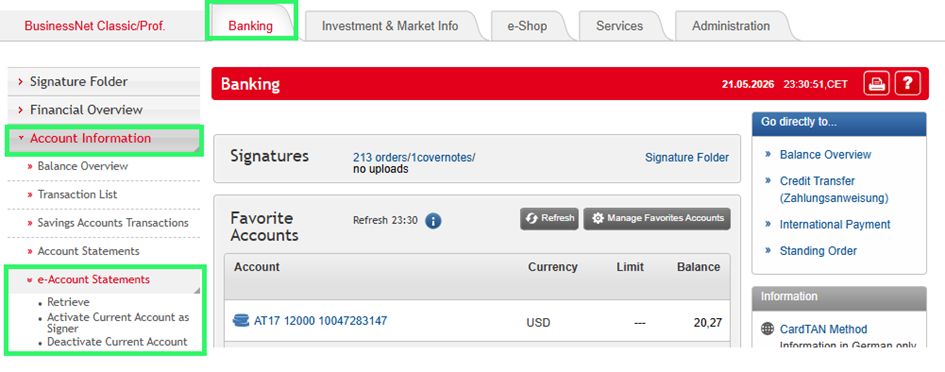
How do I request an electronic account statement in BusinessNet?
Open your BusinessNet. Under the rider › Banking you will see › Account information in the left column. Click there and › e-account statements will open via a dropdown. The following options will then open below that:
- Information retrieval: if the e-account statements have already been activated
- Activate: for requesting electronic account statements
- Deactivate: to cancel the electronic account statement service
-
How do I deactivate paper-based account statements in BusinessNet?
The paper-based account statement service is automatically deactivated when you activate the electronic account statement/e-account statement service (PDF).
-
Where do I find individual vouchers in Business Net?
There are two methods, which each lead to the same result:
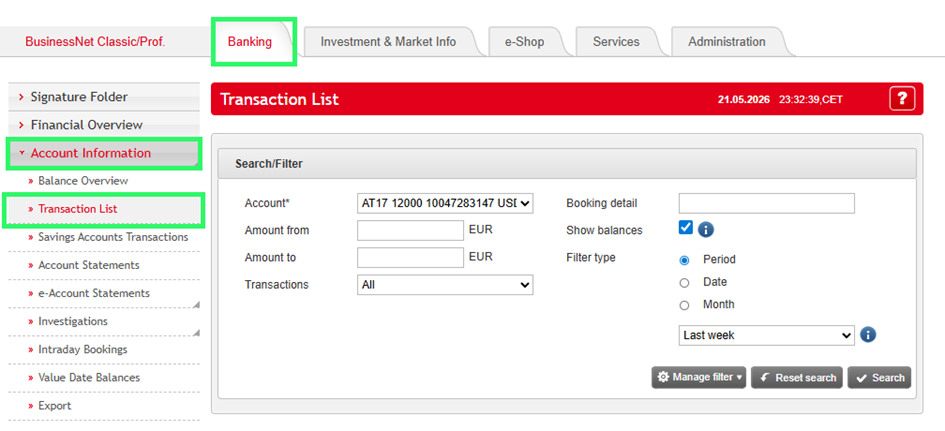
- Click the rider › Banking, then, in the left column, on › Account information and select the option › Transaction List. This will open a separate search screen with which you can look for accounting entries/vouchers.
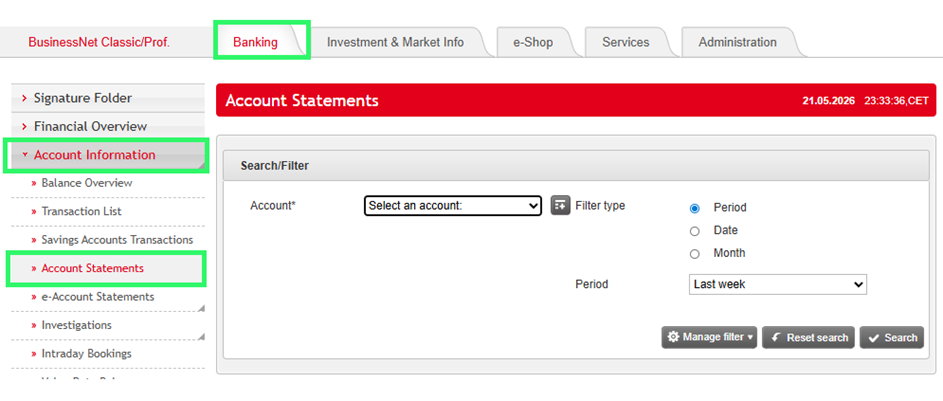
- Click the rider › Banking, then in the column on the left on › Account information and select the option › Account statements. This will open a separate search screen with which you can look for accounting entries/vouchers.
- Click the rider › Banking, then, in the left column, on › Account information and select the option › Transaction List. This will open a separate search screen with which you can look for accounting entries/vouchers.
-
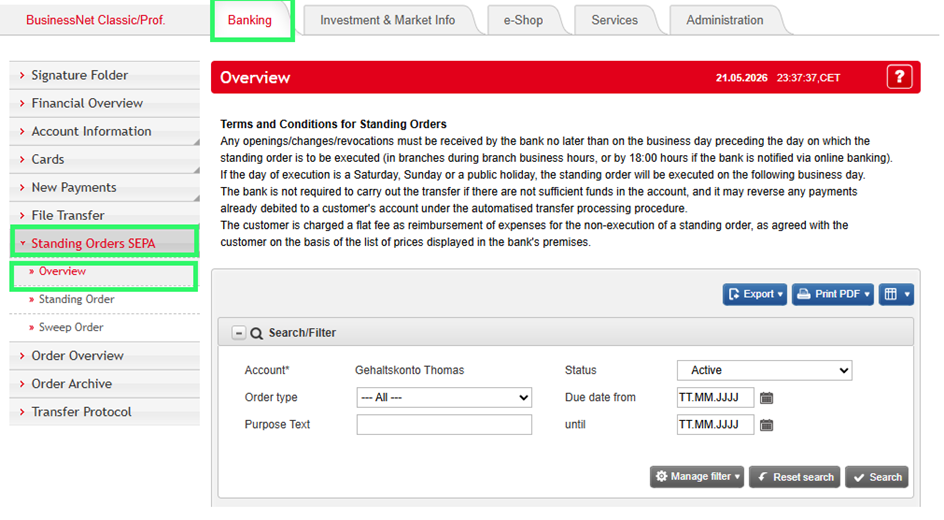
How can I view / change / delete a standing order in BusinessNet?
In BusinessNet you will find your standing orders under the rider › Banking › SEPA standing orders › Overview. There, you can view, change, suspend or cancel standing orders.
You can moreover create new standing orders with the function › New standing order.
-
How do I obtain the Limit Authorisation Code ("LAC") for BusinessNet?
Please contact your relationship manager for the LAC.
-
Where do I enter the Limit Authorisation Code ("LAC") in BusinessNet?
If you want to significantly raise your daily online banking limit, you will not receive the usual Push-TAN notification and will be asked instead to enter the Limit Authorisation Code.
-
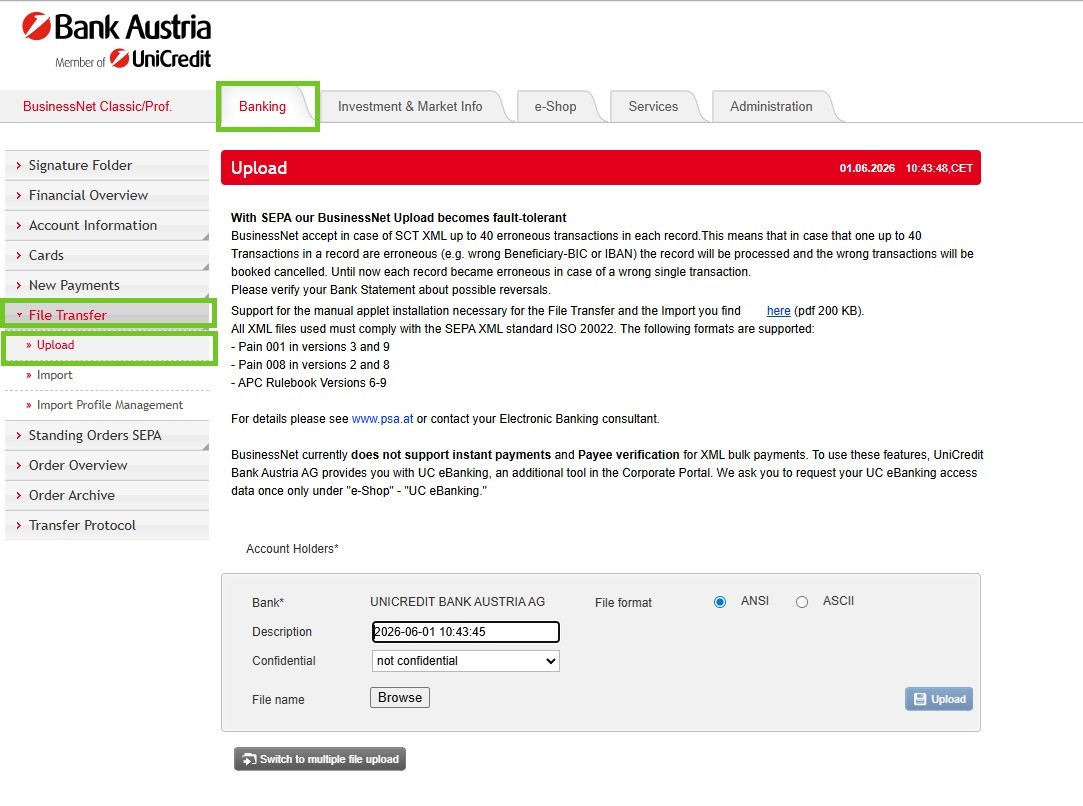
Where can I upload storage media in BusinessNet?
You can upload XML storage media under the rider › Banking › File Transfer in the left column under the item › Upload storage media.
-
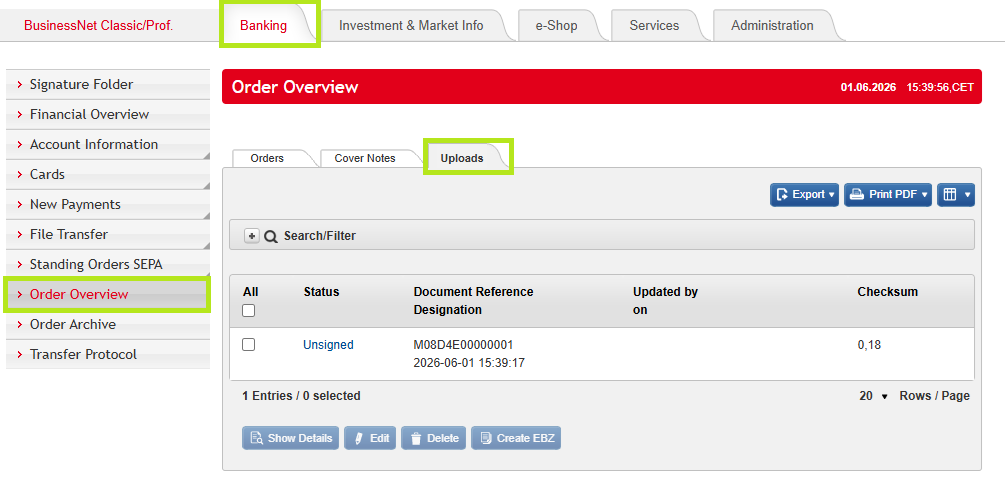
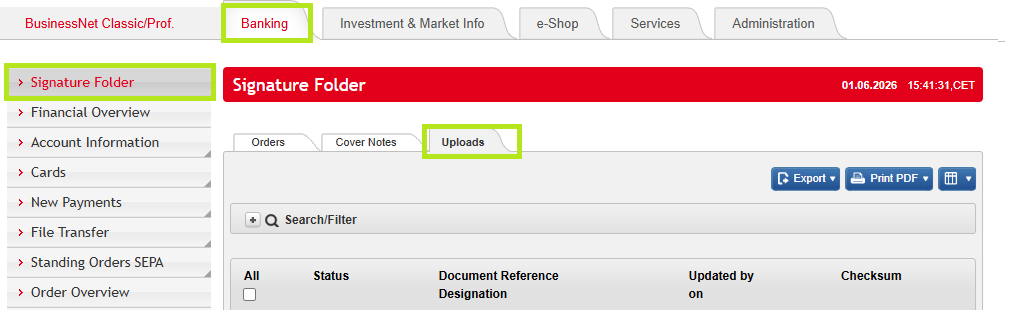
Where do I find uploaded storage media in BusinessNet?
The uploaded storage media are in the overview of orders (Banking › Order Overview › Uploads) and in the signature folder (Banking › Signature folder › Uploads).
-
Where do I find signed storage media in BusinessNet?
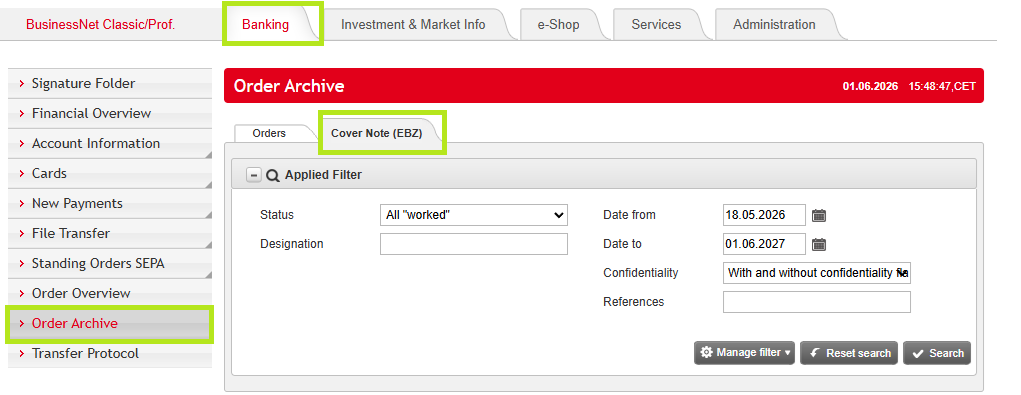
You will find signed storage media in the archive of orders.
Please note: whenever storage media is signed by you, this is modified to an “Electronic accompanying note” and is designated as such in your archive of orders.
-
How can I set up a new authorised signatory in BusinessNet?
In the riders on the top click › e-Shop and then, in the column on the left, on › Set up / delete authorised signatories (Berechtigte anlegen/löschen) › Add new authorised signatories (Berechtigte hinzufügen).
Please note: this request must be duly signed with a TAN and is only available in German.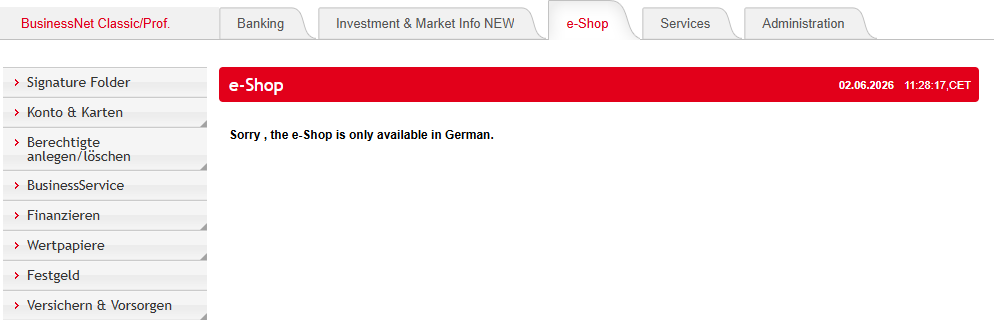
-
How can I set up a new authorised recipient of information in BusinessNet?
In the riders on the top click › e-Shop and then, in the column on the left, on › Set up / delete authorised persons (Berechtigte anlegen/löschen) › Add new authorised persons (Berechtigte hinzufügen).
Please note: this request must be duly signed with a TAN and is only available in German. -
How can I set up a new authorised recipient in BusinessNet?
On the rider click › Services, then in the column on the left on › Communication and in the following dropdown menu to the left on › Authorised recipient of electronic mail (Zustellbevollmächtigte/r elektronischer Postversand).
Please note: this request must be duly signed with a TAN and is only available in German.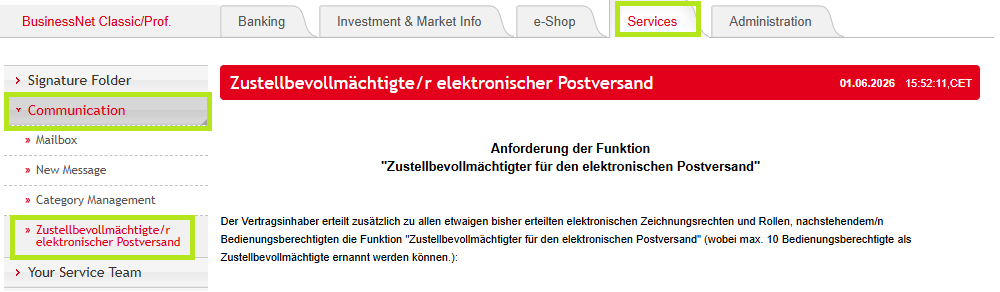
-
How can I communicate with my relationship manager in BusinessNet?
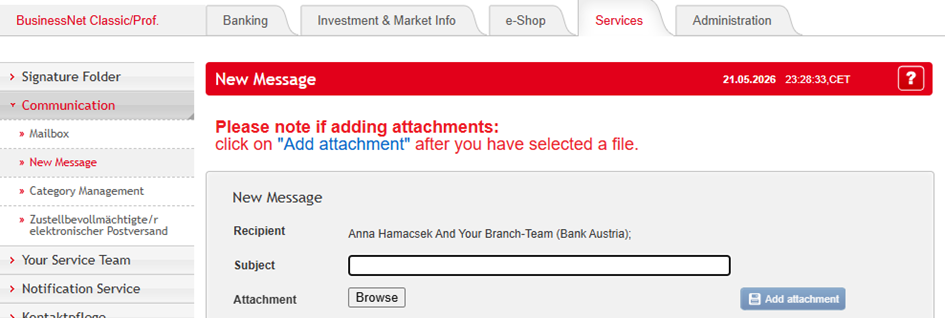
On the rider click › Services & contact, then, in the column on the left, click › Communication and select › New message in the dropdown menu.
-
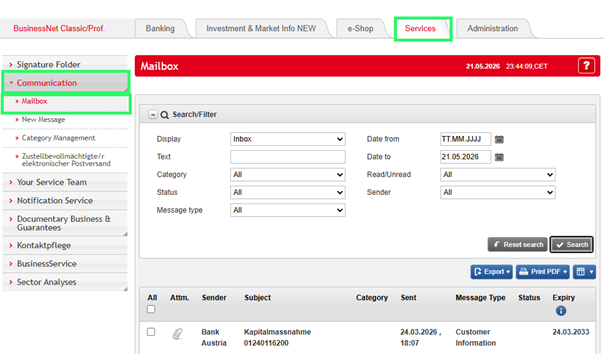
Where in BusinessNet do I see whether I have received a new message via the communications centre?
On the rider click on › Services & contact, then, in the column on the left, click on › Communication and in the dropdown menu on › Mailbox. If necessary, set the filter in the display on › Inbox › Search. You will normally, when logging in, be notified that you have received a new message in the communications centre. You will be taken directly to the message when you click on the link.
-
Where do I find the form templates in BusinessNet?
On the rider click on › e-Shop. Please note that this section is only available in German. In the subsequent column on the left you will see the various topics which are available for the relevant form-based orders.
-
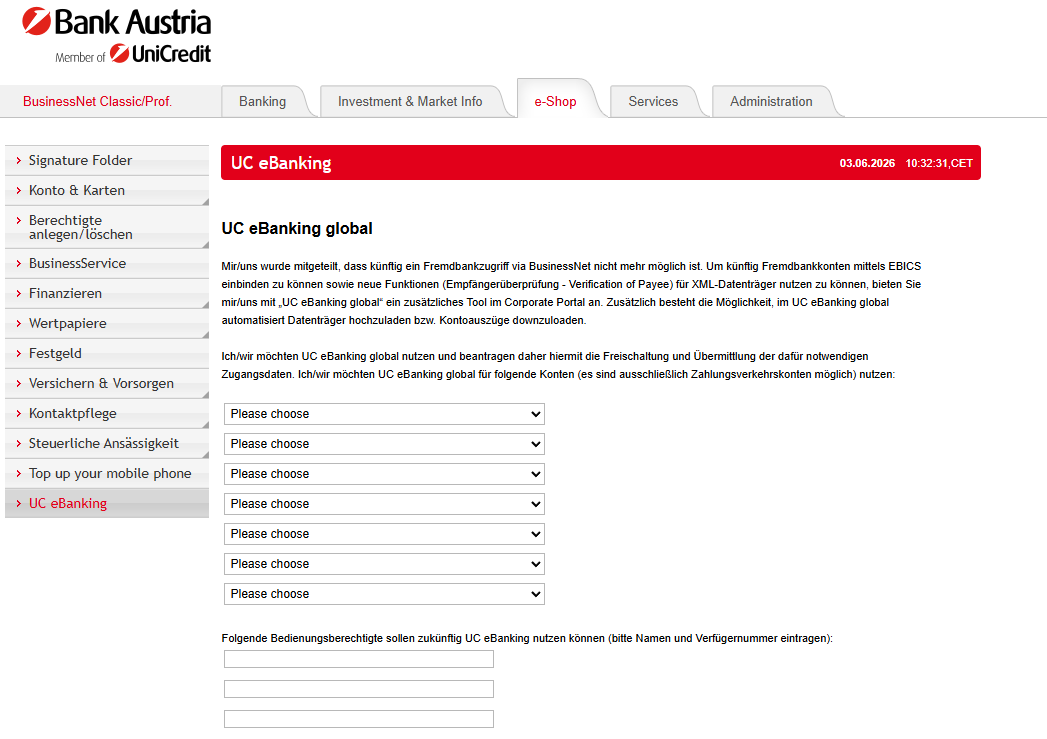
Where in BusinessNet is the UC eBanking form?
On the rider click on › e-Shop, then, in the column on the left, you will find › UC eBanking. Please note that this section is only available in German.